
How to fill in your Tax Return using your R&D Tax Incentive Schedule
We have built our firm around empowering entrepreneurs. Our services include:

Preface
Once the Rimon Advisory team have completed their work you will receive a document called a R&D Tax Incentive Schedule (RDTI Schedule).
This schedule summarises the categories into which all your R&D-eligible figures are grouped.
The final step on your end would be to ensure that the tax return is filled in correctly using the figures in the RDTI Schedule.This item, although very simple, is of crucial importance.
If done incorrectly there is an exceptionally high chance of an audit being triggered.

4 Easy Steps
There are 4 steps to consider when including your RDTI figures in your tax return. We have put a quick summary below and further detail with illustrations to follow.
01
Label D
- In the R&D Tax Incentive Schedule there is an item called “Label D, Preliminary Calculation”
- This figure needs to be inserted into the tax return in “Section 7 Label D”
- If done incorrectly it could mean that the entity is claiming both R&D notional deductions and S8 general deductions, which will likely trigger an audit
02
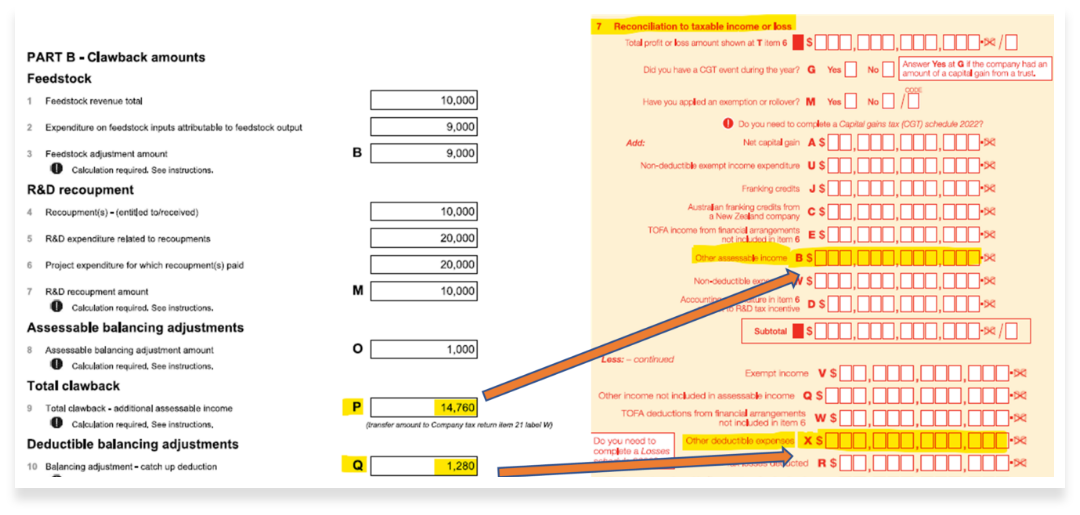
Clawback and Deductible Balancing Adjustment
- Clawback and Deductible Balancing Adjustment Insertion
- This would only be applicable if there is a Feedstock, R&D recoupment, or Assessable balancing adjustment
- This is explained in further detail below.
03
Inputting R&D Offset
- The RDTI Schedule will provide the actual RDTI offset figure
- There are 2 types of offset: 1. Refundable offset 2. Non Refundable offset
- In the tax return the refundable offset is filled in under Label U
- In the tax return the non refundable offset is filled in under Label A
04
Claim Upload and Submission (1 week)
- Detailed internal review
- Upload the entire claim to the submission portal
- Final review before submission
- Submission of claim to AusTrade
05
Other Important Items
- Once steps 1 through 3 are complete there are a few final checks to ensure that everything is in order.
- We explain these items in more detail below
More Details On Steps 1 - 4
Step 1
Filling in Label D
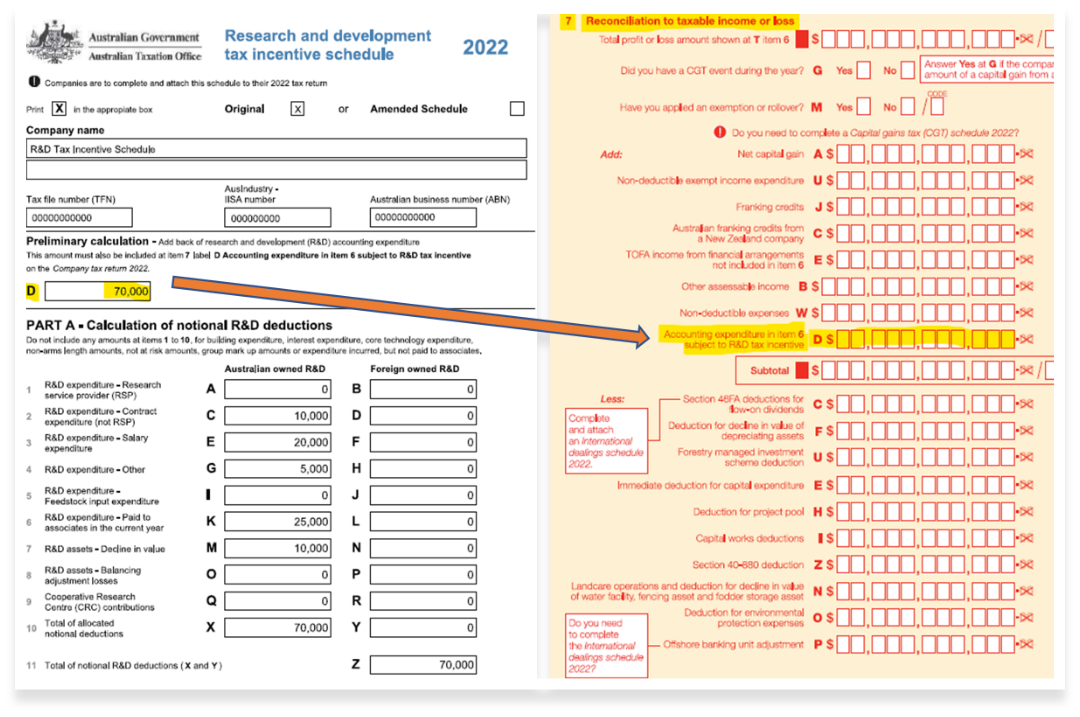
- RDTI Schedule: The figure is located in Label D - Preliminary Calculation
- Tax Return: Insert the figure above into item 7 Label D called “Accounting Expenditure in item 6 subject to R&D tax incentive”
- See illustration below
Step 2
Clawback and Deductible Balancing Adjustment
- RDTI Schedule: The figure is located in Label D - Preliminary Calculation
- Tax Return: Insert the figure above into item 7 Label D called “Accounting Expenditure in item 6 subject to R&D tax incentive”
- See illustration below

Step 3
Inputting R&D Offset
RDTI Schedule:
The figure is located in Part E R&D Tax Offset Calculation.
These 2 options are available:
- Point 2 - Refundable Tax Offset Label U
- Point 3 - Non Refundable Tax Offset Label A
Tax Return:
These 2 options are available:
- Refundable Tax Offset gets inserted into item 21 Label U called “Refundable R&D tax offset”
- Non Refundable Tax Offset gets inserted into item 21 Label A called “Non-refundable R&D tax offset”

Step 4
Other Items
Below is a list to consider before submitting the final tax return to the ATO:
Include the RDTI Schedule at the bottom of your Tax Return
- Steps 1 - 3 above indicate the pre-filing requirements
- There is still important information in other areas of the RDTI Schedule that the ATO will need
If Part A Label Z on the RDTI Schedule is > Label D Preliminary Calculation (see step 1) then it is likely that some capitalised balance items are being claimed under the RDTI.
- These capitalised items may not be depreciated as this will cause a double dipping of tax benefits
Make sure the turnover of the R&D entity in section PART D 3a of the RDTI Schedule matches the company income in section 6S of the company tax return
- If done incorrectly an audit could be triggered
Make sure the losses schedule is updated and correct after applying the R&D add back under section 7D
Check that the TFN and ABN included in the RDTI Schedule are correct
- If done incorrectly an audit could be triggered
If you are still unsure or have any other questions please reach out to your team at Rimon Advisory